If you've booked an appointment with BLS International for services such as Indian Passport Renewal, OCI, Police Clearance Certificate (PCC), or a Visa Application, but your plans have changed — there's no need to stress. Cancelling your appointment is quick, easy, and entirely manageable online. Whether you're rescheduling or no longer require the service, BLS provides a streamlined cancellation process to ensure your convenience and flexibility every step of the way.
In this blog, we'll walk you through the exact steps to cancel your BLS appointment online and what you need to know before doing it.
❓Why You Might Need to Cancel Your BLS Appointment

There are several common situations where canceling your BLS appointment becomes necessary:
- You booked the wrong service, such as OCI instead of passport renewal
- You chose the wrong BLS center or city
- Your schedule has changed, and you can't make it on the booked date
- You plan to reschedule for a more convenient time
- You've already submitted your documents via postal service
No matter the reason, cancelling your BLS appointment is the right thing to do. It not only helps you avoid confusion or delays in processing but also frees up the slot for someone else who needs it.
Step-by-Step: How to Cancel Your BLS Appointment
Follow these steps to cancel your BLS appointment online:
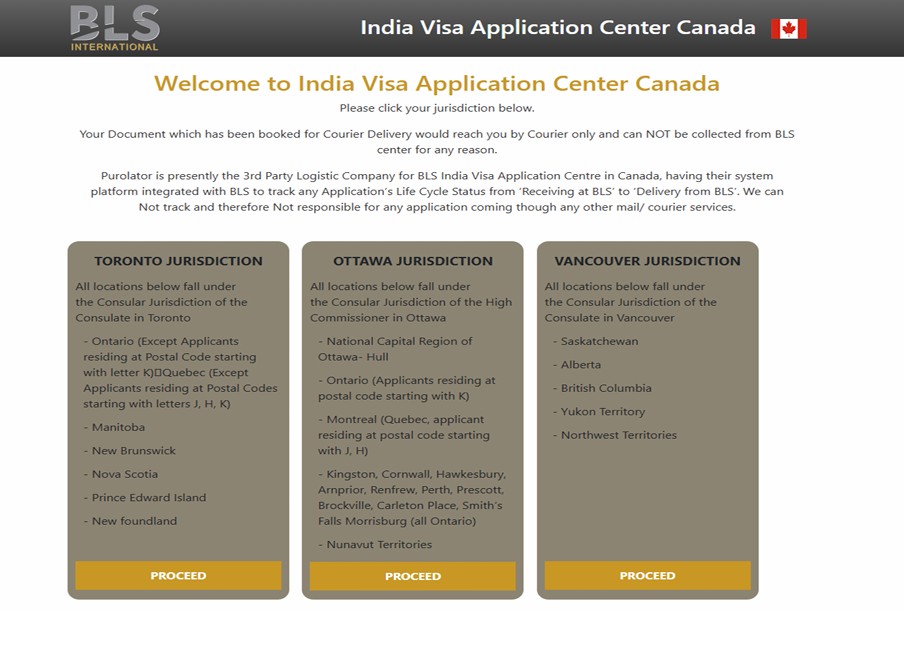
1Go to the Official BLS Website
- Visit the BLS portal for your country (e.g., www.blsindia-canada.com if you're in Canada).
- Ensure you've selected the correct jurisdiction — Toronto, Ottawa, or Vancouver — to avoid delays or rejections in your application process.
2Navigate to "Appointments"
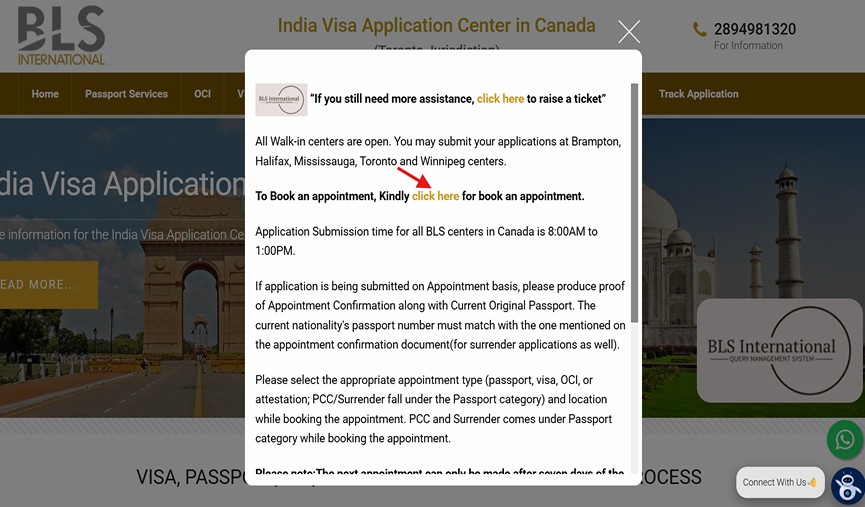
- On the homepage or top menu, click on "Appointments" or "Manage Appointments".
- Some portals may show "Cancel / Reschedule Appointment" as a direct option.
3Enter Your Appointment Details
To access or manage your appointment, you'll need to log in to your BLS account. You will be asked to provide:
- 📧 Email Address (used when you booked the appointment)
- 🔐 Password (if you created an account during the booking process)
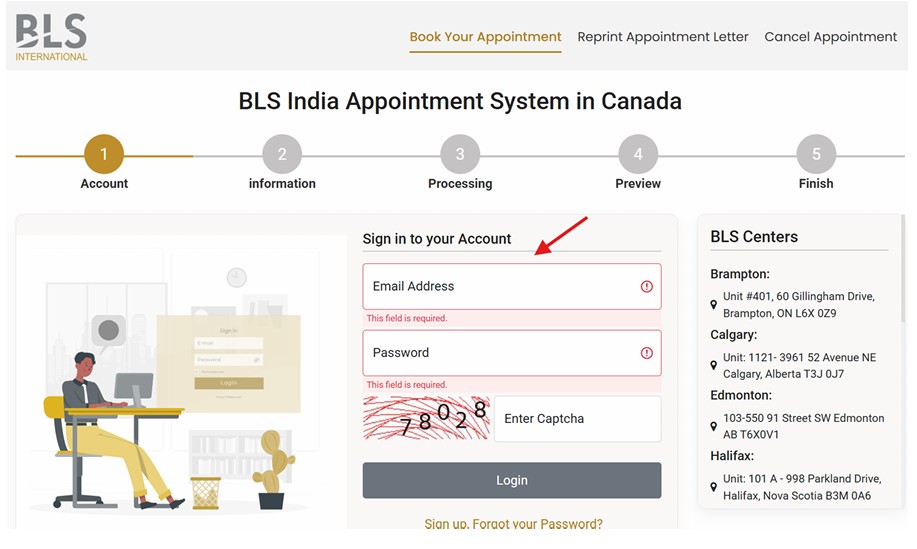
Once you log in, you'll be able to view, cancel, or reschedule your appointment easily.
⚠Tip: If you didn't create an account, check your email or SMS for your appointment reference number — some BLS portals also allow direct access using that.
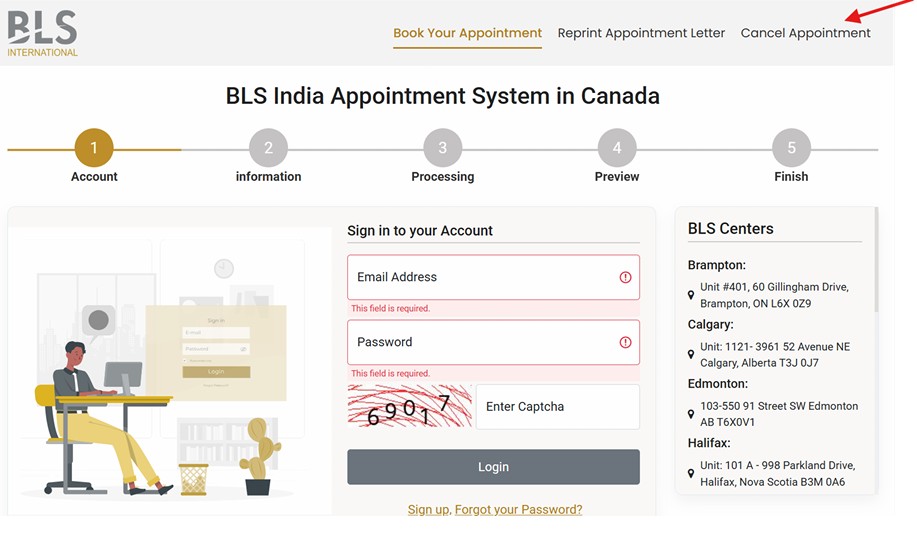
4Click on "Cancel Appointment"
- Once your details are verified, you'll see an option to Cancel or Reschedule.
- Click Cancel and confirm.
5You Will Receive a Confirmation
- After cancellation, you'll receive an email or on-screen message confirming the cancellation.
- Always keep a screenshot or save the email for your records.
Want to Reschedule Instead?

If you just want to change the date or time, most BLS portals let you reschedule without canceling and rebooking. Simply follow the same steps but choose "Reschedule Appointment".
Important Things to Remember
- You can only cancel or reschedule a limited number of times.
- Some centers may not allow rescheduling close to the appointment date.
- Appointments booked via third parties (e.g., agents or agencies) must be canceled via the same source.
Efficiency Tip: Use Purolator for Hassle-Free Submission
If securing an in-person appointment is challenging or travel isn't feasible, consider using reliable postal options instead. Many applicants choose to send their documents via Purolator —a convenient and efficient alternative that saves time, avoids long queues, and ensures safe delivery.
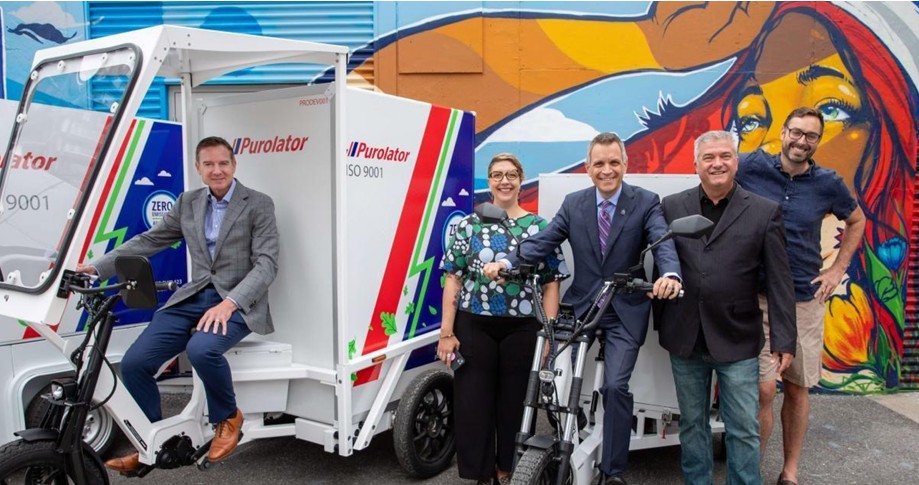
With our Purolator Pickup & Drop-Off Service, we take care of the logistics so you don't have to. All you need to do is enter your address — we'll generate the labels, schedule pickup, and route your package to the correct BLS jurisdiction.
What's Included in Our Service
- ✅Purolator pickup scheduled from your home
- ✅Both pickup and drop-off labels generated by us
- ✅Correct BLS address selected based on your jurisdiction
- ✅Email with label copies + tracking number
- ✅Purolator brings the envelope and attaches official shipping label (LabelOp)
Useful Resource
For detailed instructions on how to schedule or manage your document pickup, visit the page below:
Pickup Instructions – BLS India CanadaStay informed. Stay prepared.
茶Final Thoughts
Cancelling your BLS appointment is a quick and responsible step that keeps the system efficient for everyone. If your travel plans have shifted, or you're simply unable to attend, don't delay — cancel your slot promptly and rebook at a time that works best for you.
If you're finding the appointment process overwhelming or inconvenient, switching to a secure postal submission service can be a smarter and more efficient alternative. Services like Purolator Pickup & Drop-Off offer a streamlined solution — allowing you to submit your documents from the comfort of your home without the hassle of navigating appointment availability.
Whether you choose to reschedule or shift to postal, staying proactive ensures your application stays on track with minimal delays.
❓Frequently Asked Questions (FAQs)
1. Can I cancel my BLS appointment after the scheduled date has passed?
No, once the scheduled date has passed, the system will no longer allow cancellations or modifications. You'll need to book a new appointment.
2. Will I get a refund after canceling my appointment?
BLS appointment fees are generally non-refundable. Even if you cancel, the service fee is not returned unless explicitly mentioned during booking.
3. How many times can I cancel or reschedule my appointment?
Most BLS portals allow you to cancel or reschedule only twice. After that, you may need to start a new application with a new fee.
4. I booked my appointment through an agent. Can I cancel it online?
No. If your appointment was booked by a third-party agent or agency, you must contact them directly to cancel or make any changes.
5. I didn't receive a cancellation confirmation email. What should I do?
Check your spam or junk folder. If you still don't see it, log in to your BLS account or revisit the portal using your appointment details to verify the status.
6. Can I switch to postal submission after canceling an in-person appointment?
Yes, you can opt for a postal submission service like Purolator after canceling your in-person appointment. Just ensure your documents meet all postal requirements before shipping.
7. Is there a BLS customer care number I can call to cancel or get help with my appointment?
Yes, you can contact BLS International's customer care for support related to appointment cancellations, rescheduling, or general queries.
📞BLS Canada Contact Numbers (depending on your jurisdiction):
Recommendation: It's strongly recommended to try canceling or managing your appointment online first, as phone lines can sometimes be busy.